 admin
admin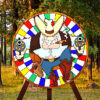
Throwing Knife is a target-aiming game where you throw at a rotating target and try to build the highest score possible. Before play begins, choose a target and set its rotation direction and speed. Since the target moves, you need to aim ahead of its current position rather than simply point at where it is now. The controls are straightforward, but careful timing and attention to hazards are important.
How to Play Throwing Knife
Use the mouse to aim, with the tip of the knife serving as your aiming point. Press the left mouse button to throw. Watch the target’s movement for a moment so you can judge its direction and pace, then release when the knife tip is lined up with the area you want to hit.
The available rotation settings let you choose how the target moves. A slower speed may make it easier to track the colored sections, while a faster rotation requires quicker decisions. Choose settings that suit your comfort level, and avoid rushing a throw if the target is approaching a hazardous area.
Throwing Knife Scoring
Points depend on the color of the section you hit. Higher-value areas can help increase your total quickly, while a white section reduces your score.
- Green: +1 point
- Blue: +2 points
- Red: +5 points
- Yellow: +10 points
- White: removes 25% of your points
For a steadier score, focus on aligning the knife tip with a colored area you can track reliably. Yellow is worth the most, but aiming for a smaller or harder-to-follow area can make a throw less predictable. The white section is a risk, so check the target’s rotation before releasing.
Hazards and Bonus Targets
Hitting a person or a bomb ends the game, so keep an eye on the full target instead of focusing only on the highest-value colors. A cowboy has a different effect: he shoots at you and takes away points until you make a successful knife throw. If he appears, prioritize landing a safe, accurate hit to stop the point loss.
Some rounds invite you to hit a target section of a specified color. Completing this bonus objective earns an extra knife. Check which color is requested before throwing, then wait for a clear opportunity to aim at it.
Controls and Practical Tips
- Mouse: Aim the knife.
- Left mouse button: Throw the knife.
Take a brief moment to observe the target’s direction and speed before each throw. Use the knife tip as your reference point, lead the moving target, and make accuracy your priority when hazards are nearby. In Throwing Knife, a well-timed safe hit can protect your score and help you work toward bonus knives.


