 admin
admin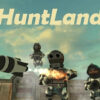
HuntLand is a free-roaming first-person shooter (FPS) in which you can explore the game world, hunt enemy characters, and take their money. Your actions can trigger retaliation, so it is useful to understand how enemies respond before you decide to attack. The game also includes a set of keyboard and mouse controls for movement, handling objects, and adjusting sensitivity.
How HuntLand gameplay works
HuntLand gives you room to move around rather than requiring you to follow a single route. As you explore, you can choose to approach enemy characters and attack them. Keep in mind that attacked characters will retaliate, with one stated exception: characters whose faces are covered by blue helmets do not retaliate.
This difference can affect how you plan your movement. Observe characters before engaging, and be prepared to move away if an enemy fights back. The game description does not specify how much money enemies carry or what happens after a retaliation, so avoid assuming that every encounter will have the same outcome.
Practical tips before attacking
- Use movement controls to explore and position yourself before starting a fight.
- Expect a response after attacking most enemy characters.
- Pay attention to the blue helmets: characters with their faces covered by them are the exception to the retaliation rule.
- Use the mouse to turn and, where applicable, operate a weapon.
HuntLand controls
The following controls are listed for the game. If a key does not appear to work in a particular situation, check whether the relevant action is available in that context.
- W, A, S, D: Move.
- Mouse: Turn or use a weapon.
- E: Hold an object.
- R: Drop an object.
- P: Save the game, if saving is available.
- H: View information.
- Esc: Release the cursor from the screen.
- K: Increase mouse sensitivity.
- M: Decrease mouse sensitivity.
Adjusting mouse sensitivity
If turning feels too slow or too fast, use K to increase mouse sensitivity or M to decrease it. Make small adjustments and test the mouse movement as you play, so you can find a setting that feels manageable. The mouse also controls turning and may be used to operate a weapon, so sensitivity can affect both actions.
Getting started
Begin by learning the movement keys and testing how the mouse responds. You can then explore, use E to hold an object when needed, and press R to drop it. Since saving is only noted as available when applicable, use P if the game supports saving in your current session.
Overall, HuntLand combines open-ended movement with encounters that can lead to enemy retaliation. Knowing the controls and recognizing the blue-helmet exception can help you make more informed choices while exploring and hunting for money.


