 admin
admin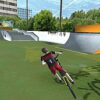
Extreme BMX Freestyle 3D is an arcade BMX game set on skateboarding-style courses. Its controls are straightforward to start learning, but combining steering, braking, jumps, and rider balance can take practice. Knowing what each key does makes it easier to move around the course and build confidence before attempting more demanding maneuvers.
Extreme BMX Freestyle 3D controls
Use the keyboard controls below to guide the bike and adjust the rider. If you are new to the game, take a moment to identify each key before riding at speed.
- W, A, S, D: Primary controls.
- X: Apply the rear brake.
- Q, E, F, V: Adjust the rider’s center of gravity.
- R: Switch to reverse.
- Space: Perform a bunnyhop.
- M: Steer.
- Tab: Open the menu.
For more precise movement, use small, deliberate inputs rather than holding several keys at once. This can help you understand how steering and balance adjustments affect the bike, especially when approaching a turn or preparing to jump.
Using the rear brake and reverse
Press X to use the rear brake. Braking can help reduce speed when approaching a turn or when you need more control. Try easing off the primary controls before braking so you can judge how the bike responds.
Press R to switch to reverse. When the reverse indicator is red, press W to deactivate reverse. Bring the bike to a speed of zero, then press R again to switch the indicator back to white reverse. Check the indicator before moving, as this can help you tell which reverse state is active.
Practice bunnyhops and balance
Press Space to bunnyhop. The rider’s center of gravity can be adjusted with Q, E, F, and V, so practice these controls at a manageable speed to learn how they work together. Start with a single jump, then make small balance adjustments and observe the result.
There is no need to combine every control immediately. First practice steering with M, then try the brake, bunnyhop, and balance keys individually. Building familiarity step by step can make it easier to handle the course and avoid confusing one input with another.
Getting started in Extreme BMX Freestyle 3D
Use Tab to access the menu when you need to pause or review the game options. Before a run, confirm that you know the primary controls and how to return from reverse. A little practice with steering, braking, and rider balance can make navigating the BMX courses more manageable in Extreme BMX Freestyle 3D.


