 admin
admin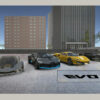
Evo-F5 is the fifth entry in a series focused on driving sports cars through an urban environment. Players can customize vehicles, arrange parts of the city to create driving routes, and choose whether to explore with traffic enabled. Knowing the main controls before starting can make it easier to manage vehicles and set up a route that suits your driving style.
What to expect from Evo-F5
The game combines urban driving with vehicle customization and environmental interaction. Its city includes ramps, barriers, and dumpsters that can be moved with a forklift or a truck. Once repositioned, these objects stay where they were placed, allowing you to build a route and return to it later.
For a smoother start, try moving one obstacle at a time and check the available space before adding another. This can help keep your route usable, particularly when you want room to maneuver a larger vehicle.
Customize vehicles and manage settings
Evo-F5 lets you personalize the vehicles and save the resulting settings. Customized setups can also be exported or shared with other users as a .vhl file. Saving a setup is useful if you want to keep a particular configuration while trying other vehicle options.
When sharing a file, make sure it is saved in the expected .vhl format. Keeping distinct configurations in separate files can also make it easier to identify the setup you want to use.
Choose how to explore the city
The traffic system can be switched on or off from the main menu. With traffic enabled, you can drive among other vehicles; with it disabled, you can explore an unpopulated city. Consider starting without traffic while learning the controls or arranging obstacles, then enable traffic when you want to drive in a busier environment.
Evo-F5 keyboard controls
The listed keyboard controls cover driving, vehicle recovery, camera changes, and forklift operation:
- WASD: Maneuver the vehicle
- Mouse: Interaction
- Enter: Reset the vehicle
- R: Fix the vehicle
- T: Slow time
- C: Change view
- Space: Handbrake
- U / J: Raise / lower the arm
- I / K: Raise / lower the fork
Use the reset and fix commands when needed, and take care to distinguish between the arm controls and the fork controls when operating the forklift. Changing the camera view can also help when positioning vehicles or moving objects around the city.
Conclusion
Evo-F5 offers urban sports-car driving alongside customizable vehicles, reusable obstacle placement, and a choice between traffic-filled and empty streets. Start with the traffic setting and controls that feel manageable, then experiment with vehicle setups and route layouts. Saving customized settings as .vhl files makes it easier to keep or share a preferred configuration.


