admin
admin
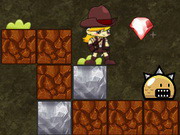
Foofoo Go Run Jump is a retro-style 2D adventure with a comic touch and a focus on speed. You control Foofoo as he runs, moves through the game, jumps, and fights. How quickly he runs depends on your input, so learning the controls and using them deliberately can help you work toward a shorter completion time.
What to expect in Foofoo Go Run Jump
The game combines familiar 2D adventure elements with a time-focused challenge. Foofoo’s speed is an important part of the experience, while movement, jumping, and fighting give you several actions to manage as you play. Its humorous tone adds a lighthearted contrast to the effort of trying to finish as quickly as possible.
Rather than treating speed as the only consideration, pay attention to what is happening on screen. Moving quickly can help you maintain momentum, but you may need to adjust your actions when a jump or fight is involved. A steady approach can make it easier to respond to the game while still aiming for a better time.
Foofoo Go Run Jump controls
You can play with a keyboard or use the on-screen buttons. The keyboard controls described for the game are:
- Shift: Accelerate.
- Arrow keys: Move, jump, and fight.
- On-screen buttons: Use the displayed controls as an alternative to the keyboard.
If you are playing with a keyboard, take a moment to get comfortable with the arrow keys before trying to move at full speed. If you are using touch controls, check where the on-screen buttons are positioned so that you can reach them without losing sight of Foofoo.
Tips for chasing a faster time
- Learn the controls first. Knowing which keys handle movement and actions can help you react without hesitation.
- Use acceleration with purpose. Shift makes Foofoo accelerate. Try it when you are ready to push the pace, and adjust your movement when you need more control.
- Pay attention before jumping or fighting. These actions are part of the controls, so choose your inputs based on what is happening on screen.
- Repeat a run to improve. If your first attempt is not as quick as you want, use what you learned about the controls to make your next attempt more efficient.
Because the challenge is to pursue the shortest time, each run can be a chance to become more familiar with Foofoo’s movement and the available controls. Focus on clear inputs rather than pressing keys without a plan.
Conclusion
Foofoo Go Run Jump offers a straightforward mix of retro 2D adventure, comedy, and a speed-based goal. Use Shift to accelerate, the arrow keys to move, jump, and fight, or choose the on-screen buttons. Getting familiar with those controls is a practical first step toward enjoying the game and aiming for a faster run.