admin
admin
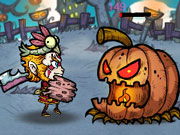
Evil Hunter is a simple action game focused on moving around the play area, getting close to monsters, and defeating them to earn coins. The controls vary by device: use touch controls on a phone or tablet, a mouse on a computer, or the keyboard’s arrow keys. Coins can be used to acquire upgrades, so defeating monsters and making progress helps you improve your character.
How to play Evil Hunter
Your main task is to move left or right and approach the monsters. Attacks work only when you are close enough, so tapping or clicking a monster from too far away will not defeat it. Move within range first, then select the monster to attack.
On a mobile device, touch the screen to move and tap a monster when you are nearby. On a computer, use the mouse to click and the arrow keys to move. If an input does not seem to work, check whether your character is close enough to the target before trying again.
Evil Hunter controls by device
- Phone or tablet: Touch the screen to move left or right, then tap a nearby monster to defeat it.
- Computer with a mouse: Click to interact with a monster when it is within reach.
- Computer keyboard: Use the arrow keys to move across the area.
For smoother play, use one control method at a time until you are familiar with how movement and attacks respond. Pay attention to your character’s position: moving closer before attacking is the key requirement described by the game’s controls.
Collect coins and get upgrades
Defeating monsters earns coins. You can use those coins to acquire upgrades for your character. Since the available upgrade types and their effects may depend on what is shown in the game, review each option before spending your coins and choose an upgrade that suits your current progress.
A practical approach is to focus on reaching monsters reliably, earning coins, and checking the upgrade options as you advance. Avoid assuming that an attack has registered if the monster is still standing; confirm that you are close enough and try again. This helps you understand the game’s range requirement and make more consistent progress.
Quick tips for new players
- Move toward a monster before tapping or clicking it.
- Use the arrow keys on a computer if you prefer keyboard movement.
- Collect coins by defeating monsters, then use them to acquire upgrades.
- If an attack does not work, reposition your character and try when closer.
Conclusion
Evil Hunter is built around a straightforward loop: move left or right, get within range of a monster, defeat it, and earn coins for upgrades. Remember that attacks only work when you are close to the target, and choose your movement controls based on your device. These basics can help you get started and make steady progress.