admin
admin
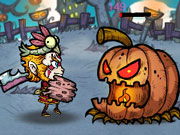
Zombies Ate All is an arcade-style game in which a horde of undead threatens to devour everything in sight. Your goal is to fight back by jumping and firing. Knowing which controls perform each action can make it easier to react when the zombies appear and keep your attention on the action.
Zombies Ate All controls
You can use the on-screen controls or the keyboard. The instructions provide these options:
- Press the on-screen Z button to jump.
- Press the on-screen X button to fire.
- On a keyboard, use the Up Arrow to jump.
- Press the Space bar to shoot.
Choose the control method that feels most comfortable on your device. If you are playing with a keyboard, check that the game window is active before using the keys. On a touchscreen, make sure your taps land on the intended buttons so that a jump or shot is not missed.
Tips for playing Zombies Ate All
Pay attention to what is happening on screen and use the jump and fire controls deliberately. Jumping can help you respond to approaching danger, while firing is the main action available for dealing with the undead. Since the controls are simple, the challenge is in timing your inputs rather than learning a long list of commands.
- Keep the controls accessible: Position your hands so you can reach the jump and fire inputs without hesitation.
- Use each action intentionally: Avoid pressing keys at random; watch the screen and respond to the situation.
- Try the alternative controls: If the on-screen buttons are awkward, test the Up Arrow and Space bar. If keyboard input is inconvenient, use the on-screen buttons instead.
- Check your device: On a keyboard, confirm that the correct key is being pressed. On a touchscreen, tap the center of each button for more reliable input.
What to expect
The available instructions describe a straightforward objective: stop the undead by jumping and firing. They do not specify additional moves, levels, weapons, or scoring rules, so those details may depend on what is displayed in the game itself. Start by getting comfortable with the two actions, then adjust your timing as the on-screen situation changes.
For a smoother session, play where you can clearly see the screen and reach your chosen controls comfortably. If a command does not seem to work, pause your input, check whether you are using the correct control set, and try again. Keeping the instructions in mind helps you focus on the central task: surviving the zombie threat.
Conclusion
Zombies Ate All centers on a simple combination of jumping and shooting. Use the on-screen Z and X buttons, or switch to the Up Arrow and Space bar on a keyboard. Once you know which input performs each action, focus on watching the screen and choosing the right moment to react.